SELENIUM LOCATORS

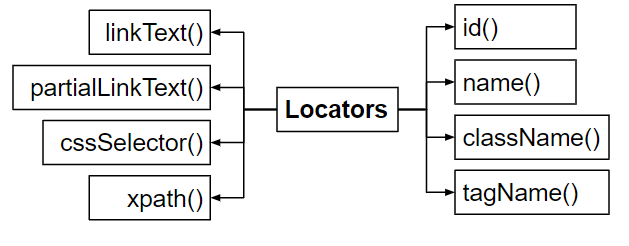
- They are used for identify the web elements uniquely within a webpage .
- we can identify the web elements uniquely using different types of locators.
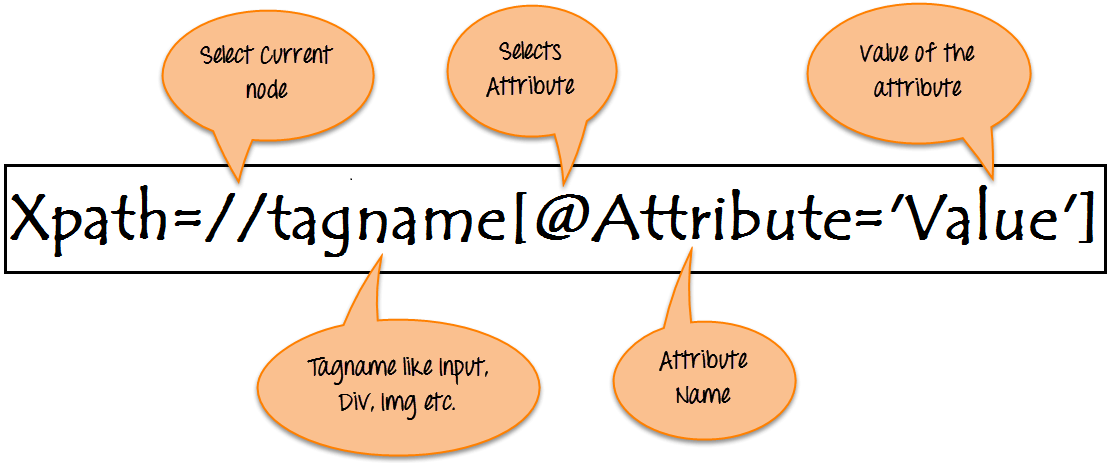
Basic Xpath Format
How to use ID Locator ?
HTML : <div id=“Input”></div>
- Here the you can see that the id of the element inn DOM is "input" so we can locate the element by
WebElement element= driver.findElement(By.id("input")).sendKeys("Testing");
How to use Name Locator ?
HTML : <div name=“search”></div>
- Here the you can see that the name of the element is "search" so we can locate the element by
WebElement element=driver.findElement(By.name("search"));
How to use Link Text / Partial Link Text Locator ?
HTML : <a href=”www.abc.com”> Google </a>
- you can see that the link text of the element is "Google " so we can locate the element by
WebElement element = driver.findElement(By.linkText(“Google”));
HTML : <a href=”www.abc.com”> Google Chrome </a>
- We can locate the element using its partial link text by.
WebElement element = driver.findElement(By.partialLinkText(“Google”));
How to use Tag Name Locator ?
HTML : < a href=”www.abc.com”> Google Chrome </a
- We can locate the element using its tag name by.
WebElement element = driver.findElement(By.tagName(“a”));
How to use Class Name Locator ?
HTML : < input type ="text" class ="input_text" id ="email">
- We can locate the element using its class by,
WebElement element =
driver.findElements(By.className(“content”));
CSS Selector-Cascading Style Sheet
- Tag & Id or #id
- Tag & class or .class
- Tag ,class & Attribute
HTML:
<input type="text" class="inputtext _55r1 _6luy" name="email"
id="email" data-testid="royal_email" placeholder="Email address or phone
number" autofocus="1" aria-label="Email address or phone number">
CSS Selector-Tag and ID
WebElement element = driver.findElement(By.cssSelector ("#email”));
or
WebElement element = driver.findElement(By.cssSelector("input#email”));
CSS Selector-Tag & class
WebElement element = driver.findElement(By.cssSelector (".inputtext ”));
or
WebElement element = driver.findElement(By.cssSelector("input.inputtext ”));


No comments:
Post a Comment