Showing posts with label Automation Testing. Show all posts

Monday, April 19, 2021

API Automation Using RestSharp [ Deserialization ]


How to Deserialize JSON Response to Class with RestSharp?


 The term Deserialization here means the conversion from the String form of JSON to a Class form. This is also called Object Representation of structured data.

  • Add Newtonsoft.json to the project via Nuget Package Manager => Manage Nuget packages for Solutions.
  • Create a model class of the json response like this

 public class Users
    {

        public string name { get; set; }
        public string job { get; set; }
        public string id { get; set; }
        public DateTime createdAt { get; set; }

    }
  • Make appropriate changes in the code like this
 public class DemoGetTest
    {
        private string BaseUrl = "https://reqres.in/";

        [Test]
        public void DeserializingJsonResponse()
        {
            var restClient = new RestClient(BaseUrl);
            var restRequest = new RestRequest("/api/users?page=2", Method.GET);
            restRequest.AddHeader("Accept", "application/json");
            IRestResponse response = restClient.Execute(restRequest);
            var content = response.Content;

            if (response.IsSuccessful)
            {
                Console.WriteLine("Status Code " + response.StatusCode);
                Console.WriteLine("Response Content " + response.Content);

            }

            //De-serialisation of Response Data 


            Root json = JsonConvert.DeserializeObject<Users>(content);
if(json.data[0].first_name== "Michael") { Console.WriteLine("operation passed "); } var jsonobject=JObject.Parse(content); int pagevalue =(int)jsonobject.GetValue("page"); } }

Saturday, January 30, 2021

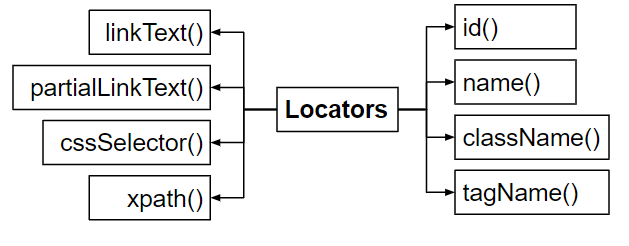
SELENIUM LOCATORS- Part I


 SELENIUM LOCATORS


  • They are used for identify the web elements uniquely within a webpage .
  • we can identify the web elements uniquely  using different types of locators.

Find Web Elements using Selenium WebDriver - GeeksforGeeks

Saturday, September 26, 2020

Robot Framework Test Automation [Part-I]


                   Selenium Python Robot Framework | Selenium Master        

ROBOT FRAMEWORK

  • Robot Framework is a generic  test automation framework mainly used for  acceptance testing 
  • It mainly utilizes the keyword driven testing approach .
  • Provides test Libraries  implemented either with the python or java and users can create  higher level keywords from existing ones.

Install python :

        you can download the latest python version from https://www.python.org/downloads.After                 `   installing the python set the path of  script folder  in python to the enviornmental variables.

          For Example :

            C:\Users\Admin\AppData\Local\Programs\Python\Python38-32\Scripts. After that go to                         command Prompt  and give the following commands and check the python is properly installed.

Install Pycharm :

         you can download the latest pycharm version from https://www.jetbrains.com/pycharm/ and                  download  the community edition.

Install Selenium :

        For installing selenium give the following command on  the command Prompt pip install                  selenium.


Install Robot framework:

  •       For installing robot framework give the following command to command Prompt
                pip install robotframework 
                
  •         After installing the robot framework we can check the details  of  framework by      using the command pip show robotframework
  •      For upgrading the framework we use pip install --upgrade robotframework